# How to change password
When a new mailbox is created (by the domain administrator), a password is also assigned.
This password can be changed by the user himself via [Webmail](https://www.indirizzofacile.it/), using a simple procedure.
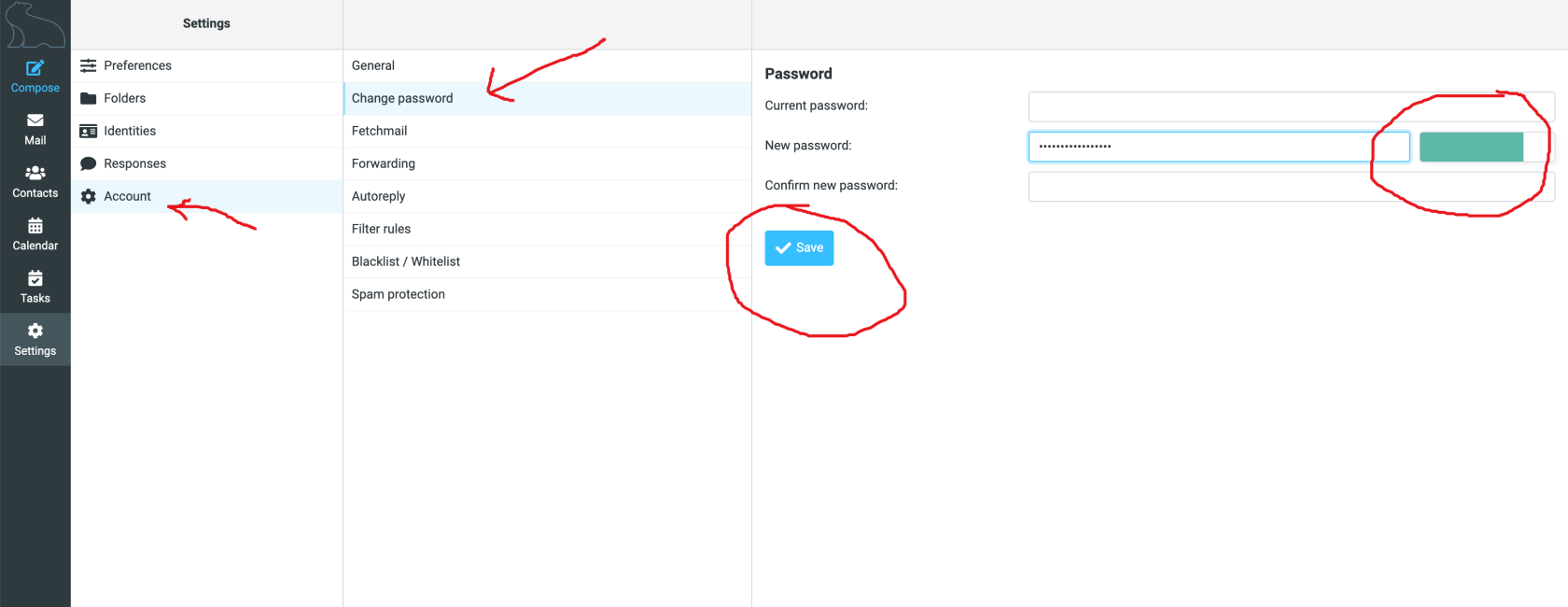
To change and use a new password, simply click on ‘**Settings**’, then on ‘**Account**’, on ‘**Change Password**’: enter the old password in the first field, then enter the new password twice (the second time for confirmation) and finally click ‘**Save**’.
[](https://help.whiteready.com/uploads/images/gallery/2024-10/pwd.png)
As you type in your new password, the area on the right will be coloured: the colour indicates the level of complexity and reliability of the password you are typing in.
It is imperative that the colour turns **green**.
After saving, a message will briefly appear: if everything went well, the message is in green and says ‘**Password saved**’, if something went wrong, the message will be in **red**.